
Groups and routing
Groups
Every API key belongs to one group. The group decides three things: which pool answers the request, what multiplier it is billed at, and which clients it admits. The wrong group is the most common cause of "model not found" and 403.
The groups
| Group | Pool | Third-party tools | Usual API | Auto order |
|---|---|---|---|---|
 Claude 满血(仅限CC) | Official Claude accounts | ✗ Claude Code only | Anthropic Messages | No |
| Claude 满血(可外接) | Official Claude accounts | ✓ | Anthropic Messages | 1 |
| GPT | Codex pool | ✓ | Responses, Chat Completions | 2 |
| Grok | Grok pool | ✓ | Chat Completions | 3 |
 Gemini | Antigravity pool | ✓ | Chat Completions | 4 |
| auto | Picks a group by model | ✓ | Follows the model | — |
All three APIs (Anthropic Messages, Chat Completions, Responses) can call every group's models; the usual API is just the most natural fit. Each group's models are in Supported models; the auto rules are in Auto routing.
How 仅限CC recognizes Claude Code
「Claude 满血(仅限CC)」 recognizes Claude Code by the request itself: its User-Agent, how its system prompt starts, and its Anthropic headers. A request that does not look like Claude Code gets 403 and is not charged. So:
- The Claude Code CLI, its VS Code and JetBrains plugins, and Claude Desktop use 仅限CC.
- SDKs, curl, local gateways such as Magpie, and other tools such as OpenCode or OpenClaw use 可外接 or auto.
Both Claude groups use the same official Claude accounts and answer with the same models; they differ only in which clients they admit and in price.
Multipliers and discounts
The top of the console's Pricing page lists every group with its multiplier and the discount it works out to:
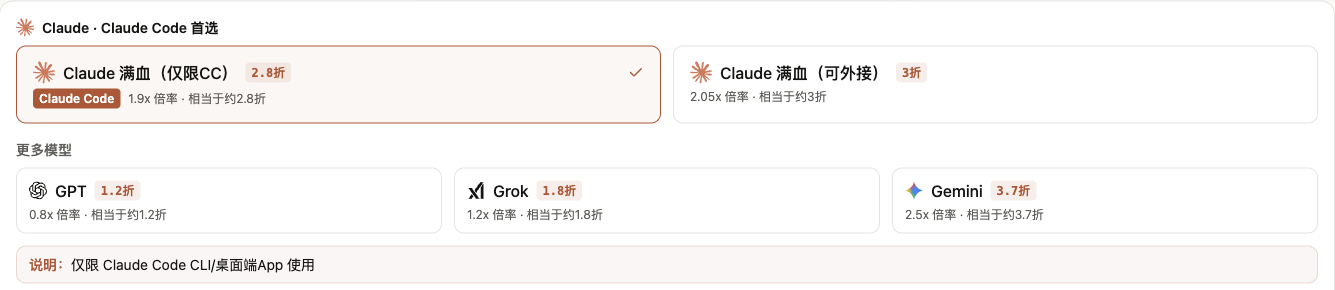
The multiplier is how many dollars of credit $1 of usage at the official price costs. ¥1 buys $1 of credit while $1 at the official price is about ¥6.8, so a multiplier of 1.9 comes to 1.9 ÷ 6.8 ≈ 28% of the official price. Multipliers can change; the console is the authority. Per-model prices in yuan are in Pricing.
See a group's models
On the Pricing page, click a group's card and the table below shows only that group's models, each with its input, output and cache prices and its saving against the official price. The button beside a model name copies it, so you can paste it into a configuration without a typo that would return "model not found".
Change a key's group
On the API Keys page, click "Edit" on the key's row, change the group and save; it takes effect at once. The key itself stays the same, so client configurations need no change. When you move to another vendor's group, change the model name in the client too.
FAQ
Is Claude in 仅限CC the same as in 可外接?
Yes. Both groups use the same official Claude accounts; they differ only in which clients they admit and in price.
Claude Code gets 403
Check the balance first. If it is fine, check whether another tool or gateway forwards the requests; they may then not look like Claude Code, and 仅限CC rejects them. Try 可外接 or auto.