
Connect
CC Switch
CC Switch is a desktop app that switches Claude Code between providers in one click. Importing CoreCode from the console takes seconds, and the card then shows your balance.
One-click import
- Install and open CC Switch (download).
- On the console's API Keys page, click ⋯ at the right end of the key's row and choose CC Switch.
- Choose Claude as the app, name it
CoreCode, chooseclaude-opus-5-5orclaude-sonnet-5-5as the main model, leave the rest empty, and click Open CC Switch. - CC Switch shows a confirmation. Check that the address is
https://corecode.live, click import, and turn on switching to it right after import.
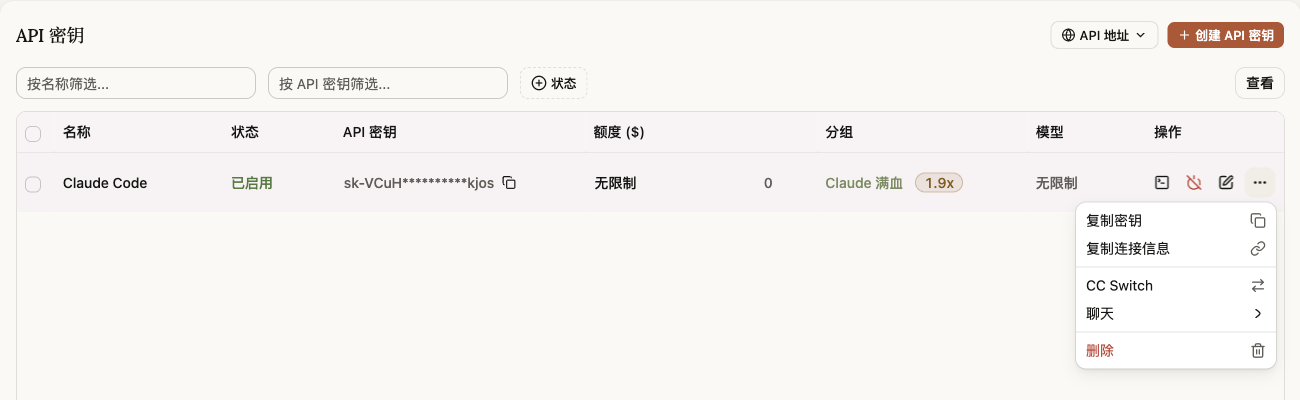
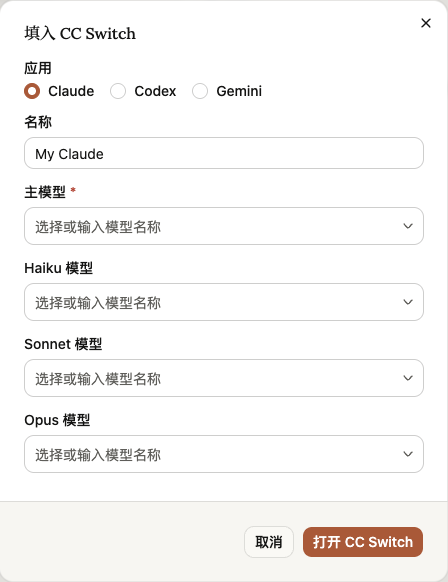
The CC Switch tab of the Connect Claude Code window has an Import to CC Switch button that does the same.
Show your balance on the card
A provider imported from the console comes with a balance query: the CoreCode card shows your account balance and refreshes every 10 minutes. The query uses the API key you imported, so no separate access token is needed.
For a provider added by hand, or one imported before this feature existed, set it up yourself: on the CoreCode card click ⋯ → configure usage query, turn on the usage query, choose the custom template, paste the script below into the script box, and save:
({
  request: {
    url: "{{baseUrl}}".replace(/\/+$/, "").replace(/\/v1$/, "") + "/api/usage/token/",
    method: "GET",
    headers: { "Authorization": "Bearer {{apiKey}}" }
  },
  extractor: function (response) {
    var data = response && response.data;
    if (!data) return { isValid: false, invalidMessage: (response && response.message) || "Query failed" };
    var q = data.user_quota;
    if (q) return { isValid: true, planName: "Account balance", remaining: q.total_available / 500000, used: q.total_used / 500000, unit: "USD" };
    if (!data.unlimited_quota) return { isValid: true, planName: "Key quota", remaining: data.total_available / 500000, used: data.total_used / 500000, unit: "USD" };
    return { isValid: true, planName: "Unlimited key" };
  }
})
If the balance does not show, edit the key in the console and check that Allow querying user quota is on under Advanced Settings. It is on by default for new keys.
Add it by hand
- In the CC Switch sidebar choose Claude Code, then click add provider at the top right.
- Choose the custom configuration preset and name it
CoreCode. - Enter the configuration below, click add, then enable it in the list:
{
  "env": {
    "ANTHROPIC_BASE_URL": "https://corecode.live",
    "ANTHROPIC_AUTH_TOKEN": "sk-your-key"
  }
}
The switch applies to new Claude Code sessions; quit and reopen sessions that are already running.